
Building and Renovating
Welcome to the South-West Oxford Building Department
A building permit is a document which grants legal permission to begin construction of any new structure, addition, or renovation. A permit is issued only when the plans for construction comply with the Ontario Building Code, South-West Oxford’s Municipal By-Laws, and other applicable laws and regulations. Building permits are necessary to ensure that zoning requirements, fire and structural safety standards, and other building standards are met (primarily for health and safety reasons). It is the building and or property owner's responsibility to ensure that a building permit is obtained when required. For more information, see the Building By-Law and the amended Schedule A: By-law 12-2023.
The Building Department is an administrative division of the Township that enforces the Ontario Building Code Act and Regulations. The Ontario Building Code (OBC) is a regulation that is set by the province, and the Township is the administrator of the Regulations. The OBC was last updated in April 2025. For news and updates regarding the OBC, see the following link: Building Code Updates. For email notifications about Code News, see here.
The Permit Process
The Township uses Cloudpermit, a cloud-based software, for the preparation and issuance of all building permits. We are pleased to offer this service to residents, builders, and our business community. This building permit system allows you to apply for and to see the status of your building (and septic system) permit application anywhere, at any time. You can start an application and finish it later, receive email updates on the status of your permit application, and even request an inspection.
A complete building permit must include the following (upload your supporting documentation as an attachment directly on Cloudpermit):
- Completed permit application form - signed-off and submitted
- Completed schedule 1 form/designer form (if applicable)
- Drawings (must be legible and clearly show construction details to scale)
- Site plan (must be fully dimensioned showing all overall dimensions of property, all buildings with dimensions on the property, and distance to property lines from all buildings/structures, and full lot coverage calculations)
- Sourcewater Protection Screening Form
- Owner authorization letter allowing the applicant to act as the owner’s agent if applicant is not the owner
- Zoning By-law Compliance Form - Applicable Law Declaration - which includes authorization/approval from any applicable authority having jurisdiction. i.e. UTRCA, Ministry of Transportation etc.
Find a complete list of application forms here!
To apply for your permit, follow the steps below:
a. Demolition Declaration Form
b. Commitment to General Review by a professional engineer where Division C, 1.2
applies
c. Site/grading plan prepared by a professional engineer (P.Eng.), and an Ontario
land surveyor (OLS)
d. Confirm compliance with applicable provisions of the Heritage Act (applicable law)
a. Site Plan
b. Geotechnical review where new foundation system or ballasting is required
c. Structural Drawings or specifications
d. Elevations where applicable
e. Sections and Detail where applicable
f. MDS II calculations if applicable (nutrient storage facilities)
a. Site Plan
b. Commitment to General Review by professional engineers, where OBC Division C, 1.2 applies
c. Foundation Plan (sealed)
d. Floor Plan including room layouts and uses (sealed)
e. Structural Plans and Specifications (sealed)
f. Building Section (sealed)
g. Engineered Roof Framing Plans
a. Site Plan (confirmation of location of building by OLS for MDS II purpose may be
required)
b. Commitment to General Review by professional engineers, where OBC Division C,
1.2 applies
c. Site Characterization Report and Commitment to General Review (where required
by the Nutrient Management Regulations)
d. Foundation Plan (sealed)
e. Floor Plan including interior penning and room layouts and uses (sealed)
f. Structural Plans and Specifications (sealed)
g. Building Section (sealed)
h. Engineered Roof Framing Plans
i. Confirmation of Drain relocate/disconnection (by Municipal Drainage
Superintendent, where applicable)
a. Approved Site Development Plan and Agreement (see Township Site Plan Control
by-law)
b. Geotechnical Investigation Report
c. Site Plan, Grading and Site Servicing Plan (s) prepared by a professional engineer
(P.Eng) and an Ontario land surveyor (OLS) (see Subsection 4.2 and 4.3 of the bylaw)
d. Commitment to General Review by a professional engineer and/or architect, where
Division C, 1.2 applies
e. Verification of on-site water supply for firefighting
f. Where applicable, a complete Private Sewage System Permit Application (see 2.,
above)
g. Architectural Drawings (sealed)
h. Structural Drawings (sealed)
i. Mechanical Drawings (sealed)
j. Electrical Drawings (sealed)
k. Sprinkler and Standpipe Drawings where applicable (sealed)
a. Approved Site Development Plan and Agreement (for townhouses, multi’s and
apartments)
b. Site Plan, Grading and Drainage Plan prepared by a professional engineer
(P.Eng.), or Ontario land surveyor (OLS) (see Subsection 4.2 and 4.3 of the bylaw)
c. Completed EEDS form
d. TARION (ONHWP) Registration Form
e. Where applicable a complete Private Sewage System Permit Application (see 2.,
above)
f. Verification of potable water supply if applicable
g. Foundation Plan
h. Floor Plan (one per floor, including all structural framing elements, dimensions,
room names and proposed plumbing fixtures)
i. Engineered Floor and Roof Framing Plans (include engineered floor and roof truss
drawings)
j. Building Elevations (4 sides)
k. Building and Detail Section
l. Mechanical Ventilation Design Summary Form
m. Heat Loss / Heat Gain Calculations and Furnace make/model
n. “New Building Service Report” from the County of Oxford Water and Wastewater
Service Department (if municipally serviced)
o. Energy Efficiency Design Summary form
p. Information sheet for MDS I calculation (if applicable)
q. Copy of deed or Record of Transfer may be required for newly created lots in
Registered Plans (if applicable)
a. Approved Site Development Plan and Agreement (see Township Site Plan Control by-law)
b. Geotechnical Investigation Report
c. Site Plan, Grading and Site Servicing Plan (s) prepared by a professional engineer
(P.Eng.),and an Ontario land surveyor (OLS) (see Subsection 4.2 and 4.3 of the by-law)
d. Commitment to General Review by a professional engineer and architect where Division C, 1.2 applies
e. Verification of on-site water supply for firefighting
f. Architectural Drawings (sealed)
g. Structural Drawings (sealed)
h. Mechanical Drawings (sealed)
i. Electrical Drawings (sealed)
j. Sprinkler and Standpipe Drawings (sealed) where applicable
k. Energy efficiency design compliance summary form (OBC Part 12; SB 10)
l. Copy of deed or Record of Transfer may be required for newly created lots in
Registered Plans (if applicable)
a. Approved Site Development Plan and Agreement (see Township Site Plan Control
by-law)
b. Commitment to General Review by a professional engineer and/or architect, where
Division C, 1.2 applies
c. Architectural Drawings (sealed), and includes applicable;
i. Elevations, Sections and Details
ii. Structural Drawings (sealed)
iii. Mechanical Drawings (sealed)
iv. Electrical Drawings (sealed)
v. Evaluation of the existing private septic system.
a. Site Evaluation Report/ test pit information
b. Where Subsection 4.2 and 4.3 of the by-law applies a Grading and Drainage Plan prepared or verified by a professional engineer (P.Eng.) and/or an Ontario land surveyor (OLS)
c. Sewage system design and construction drawings including;
i. Plan view
ii. Cross section (longitudinal and bilateral to the bed)
d. The completed ADDENDUM TO APPLICATION TO PERMIT SEWAGE SYSTEM CONSTRUCTION OR REPAIR Form
a. Site Plan or survey
b. Foundation plan
c. Floor Plan (framing)
d. Building Elevations (two sides minimum)
e. Detail or Building Section
a. Site Plan
b. Grading and Drainage Plan prepared by a professional engineer (P.Eng.), if
applicable
c. Foundation plan
d. Floor Plan(s) (one per floor, including framing elements, all dimensions, room
names or uses, and any new plumbing facilities)
e. Building Elevations
f. Building and Detail Section
g. Letter of verification from heating designer of the sufficiency of capacity of the
existing heating
h. Additional information on Existing System Sewage System may be required (where
applicable)
i. Completed EEDS form (OBC Part 12, SB 12)
a. Site plan
b. Floor plan, foundation and framing plan
c. Elevation(s)
d. Section or detail of guard
e. Detail Section (through deck view)
View the Residential Deck Design Guide.
a. A location plan or Site Plan where required
b. Approved Site Development Plan and Agreement (for townhouses, multi’s and
apartments)
c. Any of the following construction plans as applicable
i. Foundation plan
ii. Floor Plan(s) (one per floor, including framing elements, all dimensions,
room names or uses, and any new plumbing facilities)
iii. Building Elevations
iv. Building and Detail Section
d. Letter of verification from heating designer of the sufficiency of capacity of the
existing heating
e. Additional information on Existing System Sewage System may be required (where
applicable)
f. Where renovation is extensive or a Change of Use occurs a completed EEDS form
may be required (OBC Part 12, SB 12)
To create an account, complete the following steps:
- Go to the Cloudpermit site (ca.cloudpermit.com).
- Click on "create new account" found under the "continue" arrow.
- Enter your email address.
- You will then receive an email from Cloudpermit. Open that email to complete the registration process.
- Next time you visit the Cloudpermit site, login using the email and password you created using the steps above.
To start an application, complete the following steps:
- Go to the Cloudpermit site (ca.cloudpermit.com).
- Click "apply for a permit" in the upper right-hand corner.
- Create a new project and give it a name (some combination of your address and project type may help you keep track if you are applying for multiple permits).
- Once you click "next", you can provide the location of where the project will take place. You can find your property by typing in the address, and roll number, or by finding it on a map. Once you have found the correct location, click "next".
- Select the "Application Type" and "Category" before selecting "Next" again.
Once you have completed the above steps, you will see a summary. If you need to make changes, click "Back". If the information is correct, click "Create".
Under "General", you will need to complete the following steps:
- Under "Parties to the Application", you may add email addresses for any other people or companies that should have access to the application.
- Under "Application Data", indicate what type of work you are doing and the type of building you will be working on. Once you do this, additional forms you need will appear.
- Click on the forms and enter the required information.
Under "Attachments", you may be required to provide attachments like site plans, architectural drawings, etc.:
- Click on "Attachments" to see what is required for your project.
- Upload your items by dragging them into the grey box or by using the "Click Here" button to upload them from your computer.
- Once you have uploaded the files, select the type of attachment before selecting "Done".
Repeat the steps above for all of the attachments that are required for your application. If at any time you need to change or update the attachments (before submitting your application), you can delete the file by clicking on the garbage can icon and upload it again.
Once you have completed the previous steps, you are ready to sign off on your application. Submit your application to us by completing the following steps:
- Click the "Sign Off" button at the top right-hand side of the page.
- Review the items listed and indicate if you agree with the terms.
- Click "sign off on application" and your application will be submitted to us.
You can download a copy of the sign-off form at the top of the page. After submission, you will receive:
- An email to confirm your application has been submitted.
- Subsequent emails regarding its status.
- An email when your building permit is ready for pickup and how to pay.
As stipulated by the Ontario Building Code, processing a building permit application typically takes between 10 to 30 business days, depending on the size and class of the project.
Residential permit applications may take up to 10 business days to process. Commercial and Industrial building applications may take 20 business days to process.
Please view the Citizen's Guide to Land Use Planning for more information.
The above timelines are for complete applications. A complete application meets zoning requirements, Building Code, applicable law, and the submitted documents provide all required information.
The Building Department is prepared to provide reasonable assistance to the applicant but will not assist in the laying out of work or acting in the capacity of an engineering or architectural consultant.
You will receive an email when your permit is ready to be picked up. It will advise the current payment options available.
Building Department Permit Fees
We offer a variety of payment options, including:
- Telephone and Internet banking.
- EFT (electronic funds transfer).
- Cash, debit, or cheque at the Township Office.
Once you have received your permit and the work is underway, you will require our Building Inspector to visit your site and sign off on your work at various points in the project.
To determine if your project is ready for inspection, reference the following checklists:
- Pre-Backfill
- Footing
- Framing
- Underground Plumbing
- Above-Ground Plumbing
- HVAC and In-Floor Heating
- Final/Occupancy
- Residential Occupancy Permit Checklist
To book an inspection, complete the following steps:
- Login to the Cloudpermit site (ca.cloudpermit.com) and select "Go to Project" under the project requiring an inspection.
- Select the application by clicking the address. A page will appear with the details of your project's location. At the bottom of that page, you will see the heading "Work & Construction" and a box titled "Inspections".
- Click on "Show Upcoming Inspections" and select "Request Inspection" under the building element you are ready to have reviewed.
- Under the "New Inspection Request" that appears, select the date and time you would like to request.
- You will see the unconfirmed request listed. Once our staff receives your request, you will get an email confirmation for the inspection.
If you need to change the date or time, or cancel the request, select "Modify Request".
If you would like to book an inspection over the phone during regular office hours, please call our Municipal Office: 519-485-0477.
Please note, inspections for the next business day will not be booked after 12:00 p.m. (noon EST) the previous business day.
Tips:
- At any point during the process, you can return to the "My Dashboard" page to see which applications you have made and if our office needs more information to process your application.
- You can delete your application at any time by using the "Select Action" drop-down menu at the top of the page.
- Use Cloudpermit Support for answers to frequently asked questions.
Ontario released a new Building Code to release regulatory burdens for the construction industry, increase the safety and quality of buildings and make it easier to build housing projects. The 2024 Building Code came into effect on January 1, 2025 with a three-month grace period until March 31, 2025 for certain designs that were already underway.
Visit the provincial website to learn more.
Permit inquiries? Contact: building@swox.org or phone 519-485-0477 ext. 7001
Building permits are required for the construction or alteration of any building occupying an area greater than ten square metres (108 square feet) consisting of a walk, roof, and floor or a structural system serving the function thereof including all plumbing works, fixtures, and service systems appurtenance thereto.
What projects require a building permit?
This list is not limited to these items only.
- Additional Residential Units (ARUs) - smaller self-contained dwelling units having its own kitchen, bathroom and sleeping area(s) that are attached to, or in an ancillary building on the same property as the primary dwelling. Take our ARU Process Questionnaire to determine if your lot is eligible.
- Detached garage, shed, or accessory structure 108 square feet or greater in size (measured to the outside face of exterior walls).
- Attached garage, carport, shed, or other roof structure of any size.
- Decks greater than 24 inches above grade. - spec sheet for building residential decks.
- Finishing the basement of a house or adding a bedroom to the basement.
- Additions to a building.
- Enclosures for swimming pools with a depth of 24 inches or greater (including temporary or inflatable pools).
- Creating a duplex/additional dwelling/apartment (a.k.a. in-law suite, accessory apartment, granny flat, etc.)
- Plumbing fixtures added or relocated.
- Removing a load bearing wall, column, lintel, or beam.
- Re-insulating walls, ceilings, or floors.
- Wood stove or wood burning fireplace.
- Installing a new window or door when increasing the width of the existing opening.
- Retaining wall that is greater than three feet and three inches in height, pending location.
- Solar panels that are mounted to a building.
- Site servicing (water or sewer lines) for all building types.
- New residential dwellings.
- Demolition of a structure greater than 108 square feet in building area, except for farm buildings.
- Tent or a group of tents that is more than 60 square metres (646 square feet) in aggregate ground area, attached to a building, or constructed within three metres (nine feet and 10 inches) of any structure.
- Industrial, commercial, institutional, and multi-residential construction or alterations, or changes of use.
- Backflow prevention device for lawn irrigation systems connected to potable water.
- Farm buildings, including: barns; bins; bunker silos; silos; sheds; etc.
What projects do not require a building permit?
This list is not limited to these items only.
- Structure less than 108 square feet measured from the outside face of the walls (that does not contain plumbing).
- Gas fireplace.
- Fence (must comply with zoning regulations).
- Water softener installations.
- Painting, wallpapering, tiling, carpeting, cabinets, countertops, and similar finish work.
- Door and window replacements (within the existing opening, where no structural members are changed or has no fire resistance rating).
- Installing new shingles on an existing roof.
- Replacing a plumbing fixture (i.e. toilet, bathtub, or sink) with a new fixture in the same location.
- Tents under 60m2 (646ft2)
Permits are required to not only protect yourself and other normal users of the space but to protect the public that may enter into a space or protect future owners and users of the space or building. If a person does work or makes changes to a space or building without a permit; that person, company, or owner may become liable for any future problems or issues that may arise. The process of obtaining a permit is to protect the health and safety of the public for the duration of the building’s life.
In addition to requiring a building permit, structures, alterations, and/or demolitions must adhere to the Zoning By-Law in regards to the zoning of the property, the setbacks (distance to neighbouring properties), as well as the height of a structure. Zoning Amendments and/or Minor Variances will be required if an applicant wishes to build outside of the regulations in the Zoning By-Law. For more information about zoning, setback, and height requirements, see The Zoning By-Law/Oxford County Planning.
To answer any further questions, contact the SWOX Building Department at building@swox.org or by phone at 519-485-0477 x 7001.
Yes. As regulated under the Ontario Building Code, any tent over 60 m2 (646 ft2), any size tent attached to a building, or any size tent constructed less that 3 m from other structures (including septic systems), requires a building permit.
A demolition permit is required for all buildings that would normally require a building permit. The Ontario Building Code exempts farm buildings located on agriculture property.
Please complete a building permit application - selecting "Demolition" as the category, and "Demolish" as the work type. Then, select the work target that reflects the structure you intend to demolish. You will need to submit a site plan showing the distances from other structures, property lines, septic tanks and utilities - as well as a completed Schedule 1 Form and Utility Disconnect - Demolition Permit Application Checklist.
Once the demolition permit is issued and complete, filling out a 357 Form is required. Once filled out, please send to building@swox.org
For more information regarding decommissioning a septic tank, click the following link: Decommissioning Septic Tanks/Sewage Systems Information Guide.
If you wish to utilize fire in the demolition process - please contact the Fire Chief for more information.
Building By-Laws, Development Charges & Fee Schedules
Building Department Permit Fees
Oxford County Development Charges and Fees
Township of South-West Oxford Development Charges
Township of South-West Oxford Zoning Information
Additional Residential Units
ARUs are smaller, self-contained dwelling units (i.e., with their own kitchen, bathroom and sleeping areas) that are inside, attached to, or in an ancillary building on same property as a primary dwelling, including single detached dwellings, semi-detached dwellings and street fronting townhouses. ARUs can take many forms, such as basement apartments, attached suites, tiny homes and coach houses, but they must be smaller than the principal dwelling or residence.
The Township of South-West Oxford has amended the Township Zoning By-law with respect to ARUs and the new provisions came into force and effect on February 17, 2026. The new ARU By-law can be found here: By-law No. 12-2026.
Thinking about constructing an ARU on your property? BEFORE applying for a permit, review the following documents to determine if your lot is eligible, and if your proposed construction meets current Official Plan (OP) policies:
- Fact Sheets:
- For information on planning policies, zoning requirements, and approval processes for Additional Residential Units, contact Development Planner Laurel Davies Snyder by email or phone at 519-539-9800 ext. 3217. Planning staff can explain applicable requirements and review planning applications but do not prepare designs or plans on behalf of property owners.
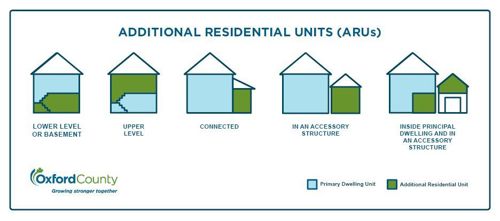
More Information
If you are in need of a new municipal addressing sign, please contact our office: 519-485-0477 or contact us by email.
Sign Costs
As per Township of South-West Oxford By-law No. 37-95, the costs associated with the purchasing and posting of a property’s civic numbers are the property owner’s responsibility. The owner must ensure that the sign plate is clearly visible from the road and does not become blocked by surrounding vegetation or otherwise obscured. The owner will be responsible for all costs associated with maintenance and/or replacement when necessary.
Sign Location
- The civic number plate is to be placed on its own post, within 3 meters (10 feet) from the property line and within 3 meters (10 feet) from the edge of the driveway (unobstructed by mailboxes, etc.) perpendicular to the fronting road.
- The plate must be a minimum of 1.5 meters (5 feet) above grade, and a maximum of 2 meters (6 feet, 6 inches) above grade.
- Any variation of this provision is subject to the approval of the Chief Building Official, Public Works Superintendent, or other designated individual.
- Submit a locate request to Ontario One Call before digging to identify any buried utilities: www.ontarioonecall.ca or 1-800-400-2255
For more information, please contact the Building Department: 519-485-0477
Please be advised that the Township is unable to provide copies of land surveys, as legally, a completed survey belongs to the surveyor. If you require a survey for your property, please contact a local land surveyor, or the lawyer you used when your property was originally purchased (as they may have a copy on file).
Land ownership documents may be found on the provincial website, or through the Ontario Land Property Records Portal.
- Who Pays for Growth?
- Oxford County Development Charges and Fact Sheet (June 2024)
- Oxford County Development Charges By-law (June 2024)
- FACT SHEET Development Charge Interest Rates (July 2024)
- South-West Oxford Municipal Development Charges By-law (June 2024)
- For questions regarding Oxford County Development Charges, please contact: planning@oxfordcounty.ca